HUB
Networks using a Star topology require a central point for the devices to connect.
Originally this device was called a concentrator since it consolidated the cable runs from
all network devices. The basic form of concentrator is the hub.
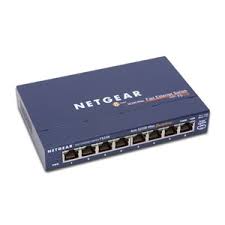

As shown in Figure; the hub is a hardware device that contains multiple, independent
ports that match the cable type of the network. Most common hubs interconnect
Category 3 or 5 twisted-pair cable with RJ-45 ends, although Coax
BNC and Fiber Optic
BNC hubs also exist. The hub is considered the least common denominator in device
concentrators. Hubs offer an inexpensive option for transporting data between devices,
but hubs don't offer any form of intelligence. Hubs can be active or passive.
An active hub strengthens and regenerates the incoming signals before sending the
data on to its destination.
Passive hubs do nothing with the signal.
Ethernet hubs
An Ethernet hub is also called a multiport repeater. A repeater is a device that amplifies
a signal as it passes through it, to counteract the effects of attenuation. If, for example,
you have a thin Ethernet network with a cable segment longer than the prescribed
maximum of 185 meters, you can install a repeater at some point in the segment to
strengthen the signals and increase the maximum segment length. This type of repeater
only has two BNC connectors, and is rarely seen these day

8 Port mini Ethernet Hub
The hubs used on UTP Ethernet networks are repeaters as well, but they can have many
RJ45 ports instead of just two BNC connectors. When data enters the hub through any
of its ports, the hub amplifies the signal and transmits it out through all of the other
ports. This enables a star network to have a shared medium, even though each
computer has its own separate cable. The hub relays every packet transmitted by any
computer on the network to all of the other computers, and also amplifies the signals.
The maximum segment length for a UTP cable on an Ethernet network is 100 meters. A
segment is defined as the distance between two communicating computers. However,
because the hub also functions as a repeater, each of the cables connecting a computer
to a hub port can be up to 100 meters long, allowing


