Check out in INSTAGRAM

Instagram

Wednesday, 6 November 2013

Computer Name and IP Change through Batch file

step 1 : Open note pad
step 2 : Copy and paste the below content

@echo off
SET /P PCNAME=Please enter your name:

REG ADD HKLM\SYSTEM\CurrentControlSet\Control\ComputerName\ComputerName /v ComputerName /t REG_SZ /d %PCNAME% /f
REG ADD HKLM\SYSTEM\CurrentControlSet\Control\ComputerName\ActiveComputerName\ /v ComputerName /t REG_SZ /d %PCNAME% /f
REG ADD HKLM\SYSTEM\CurrentControlSet\Services\Tcpip\Parameters\ /v Hostname /t REG_SZ /d %PCNAME% /f
REG ADD HKLM\SYSTEM\CurrentControlSet\Services\Tcpip\Parameters\ /v "NV Hostname" /t REG_SZ /d %PCNAME% /f
PAUSE

@echo off
SET /P ip=Please enter your ip:
SET /P mask=Please enter your mask:
netsh int ip set address name="Local Area Connection" source=static addr=%ip% mask=%mask%
pause

step 3 : Save as CHANGE.BAT (.bat format)
step 4 : Run the batch file 

Tuesday, 5 November 2013

Routing

Introduction

Routing is one of the most important features in a network that needs to connect with other networks. In this page we try to explain the difference between Routed and Routing protocols and explain different methods used to achieve the routing of protocols.The fact is that if routing of protocols was not possible, then we wouldn't be able to comminucate using computers because there would be no way of getting the data across to the other end !

Definition

Routing is used for taking a packet (data) from one device and sending it through the network to another device on a different network. If your network has no routers then you are not routing. Routers route traffic to all the networks in your internetwork. To be able to route packets, a router must know the following :
*Destination address
*Neighbor routers from which it can lean about remote networks
*Possible routes to all remote networks
*The best route to each remote network
*How to maintain and verify routing information
I would like to define 3 networking terms :

Convergence: The process required for all routers in an internetwork to update their routing tables and create a consistent view of the network, using the best possible paths. No user data is passed during convergence.

Default Route: A "standard" route entry in a routing table which is used as a first option. Any packets sent by a device will be sent first to the default route. If that fails, it will try alternative routes.

Static Route: A permanent route entered manually into a routing table. This route will remain in the table, even if the link goes down. It can only be erased manually.

Dynamic Route: A route entry which is dynamically (automatically) updated as changes to the network occur. Dynamic routes are basically the opposite to static routes.

OSI Model

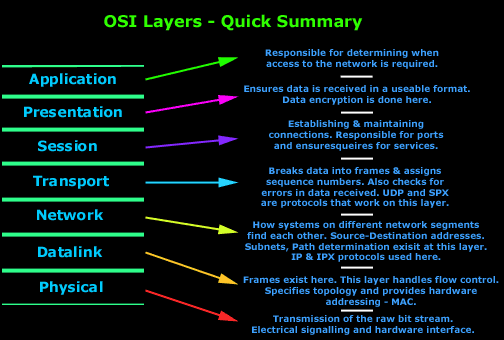
The OSI Model

OSI is a standard description or "reference model" for how messages should be transmitted between any two points in a telecommunication network. Its purpose is to guide product implementors so that their products will consistently work with other products.

As most are aware of, the OSI model consists of 7 layers.

Each layer has been designed to do a specific task. Starting from the top layer (7) we will see how the data which you type gets converted into segments, the segments into datagrams and the datagrams into packets, the packets into frames and then the frames are sent down the wire, usually twisted pair, to the receiving computer.
7-layer-osi-analysis

What is Router ?

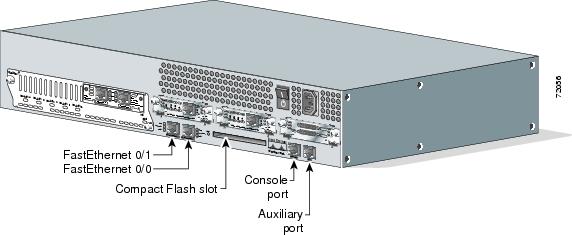
A router is a device that forwards data packets between computer networks, creating an overlay internetwork. A router is connected to two or more data lines from different networks. When a data packet comes in one of the lines, the router reads the address information in the packet to determine its ultimate destination. Then, using information in its routing table or routing policy, it directs the packet to the next network on its journey. Routers perform the "traffic directing" functions on the Internet. A data packet is typically forwarded from one router to another through the networks that constitute the internetwork until it reaches its destination node.

Information About VLAN

What is a LAN?

Okay, most of you already know what a LAN is but let’s give it a definition to make sure. We have to do this because, if you don’t know what a LAN is, you can’t understand what a VLAN is.A LAN is a local area network and is defined as all devices in the same broadcast domain. If you remember, routers stop broadcasts, switches just forward them.

What is a VLAN?

As I said, a VLAN is a virtual LAN. In technical terms, a VLAN is a broadcast domain created by switches. Normally, it is a router creating that broadcast domain. With VLAN’s, a switch can create the broadcast domain.This works by, you, the administrator, putting some switch ports in a VLAN other than 1, the default VLAN. All ports in a single VLAN are in a single broadcast domain.Because switches can talk to each other, some ports on switch A can be in VLAN 10 and other ports on switch B can be in VLAN 10. Broadcasts between these devices will not be seen on any other port in any other VLAN, other than 10. However, these devices can all communicate because they are on the same VLAN. Without additional configuration, they would not be able to communicate with any other devices, not in their VLAN.

Are VLANs required?

It is important to point out that you don’t have to configure a VLAN until your network gets so large and has so much traffic that you need one. Many times, people are simply using VLAN’s because the network they are working on was already using them.Another important fact is that, on a Cisco switch, VLAN’s are enabled by default and ALL devices are already in a VLAN. The VLAN that all devices are already in is VLAN 1. So, by default, you can just use all the ports on a switch and all devices will be able to talk to one another.

When do I need a VLAN?

You need to consider using VLAN’s in any of the following situations:
*You have more than 200 devices on your LAN
*You have a lot of broadcast traffic on your LAN
*Groups of users need more security or are being slowed down by too many broadcasts?
*Groups of users need to be on the same broadcast domain because they are running the same applications. An example would be a company that has VoIP phones. The users using the phone could be on a different VLAN, not with the regular users.Or, just to make a single switch into multiple virtual switches.

Why not just subnet my network?

A common question is why not just subnet the network instead of using VLAN’s? Each VLAN should be in its own subnet. The benefit that a VLAN provides over a subnetted network is that devices in different physical locations, not going back to the same router, can be on the same network. The limitation of subnetting a network with a router is that all devices on that subnet must be connected to the same switch and that switch must be connected to a port on the router.